BARE METAL.
Run a coding agent against a local open-weights model. No API bill, fully private, your model on your metal.
$10 early · $20 door · FT members free (FTMEMBER)
WHILE YOU SETTLE IN.
brew install ollama
ollama pull qwen2.5-coder:7b   # start it NOW, ~4.7GB
# optional: score your machine
brew install AlexsJones/llmfit/llmfit && llmfit
curl -fsSL https://ollama.com/install.sh | sh
ollama pull qwen2.5-coder:7b   # start it NOW, ~4.7GB
# optional: score your machine
brew install AlexsJones/llmfit/llmfit && llmfit
# download + run the installer from ollama.com
ollama pull qwen2.5-coder:7b   # start it NOW, ~4.7GB
# optional: score your machine (PowerShell)
scoop install llmfit; llmfit
# enable Linux first: Settings > About ChromeOS > Developers
curl -fsSL https://ollama.com/install.sh | sh
ollama pull qwen2.5-coder:3b   # CPU-only, start small
uv tool install -U llmfit && llmfit
EVERY AGENT YOU RUN IS RENTING THE CORD.
Every coding agent you run today phones home to someone else's GPU and meters you per token. That is two costs, not one. [EV]
Tonight we cut the cord. The agent points at a model on your own metal. Zero per-run cost, nothing leaves the room.
OPEN-WEIGHTS CODERS GOT GOOD.
The open-weights coder tier is now genuinely usable for real tasks. These all live on Hugging Face. [HF]
ONE CONTRACT. SWAP WHAT ANSWERS IT.
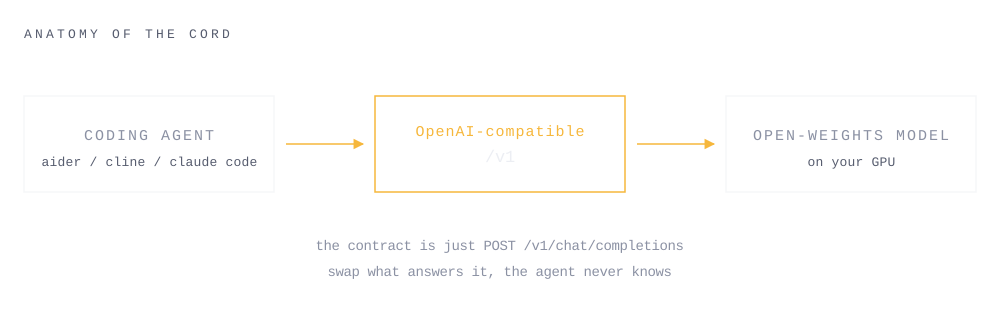
The contract between agent and model is just POST /v1/chat/completions. Local vs hosted is nothing but which URL the agent's base points at. [OLLAMA-OAI]
THREE SERVERS. THREE AGENTS.
Reference path tonight: Ollama + Aider (fewest moving parts). Cline for a GUI. Claude Code talks to Ollama natively now. [OLLAMA-OAI] [CLINE] [OLLAMA-CC]
DO NOT GUESS YOUR VRAM. SCORE IT.
brew install AlexsJones/llmfit/llmfit

llmfit          # interactive TUI, ranks models for your machine
llmfit fit      # same ranking, plain list
llmfit doctor   # hardware report (ram / cpu / gpu)
brew install AlexsJones/llmfit/llmfit

llmfit          # interactive TUI, ranks models for your machine
llmfit fit      # same ranking, plain list
llmfit doctor   # hardware report (ram / cpu / gpu)
scoop install llmfit

llmfit          # interactive TUI, ranks models for your machine
llmfit fit      # same ranking, plain list
llmfit doctor   # hardware report (ram / cpu / gpu)
uv tool install -U llmfit   # inside the Crostini Linux terminal

llmfit          # interactive TUI, ranks models for your machine
llmfit fit      # same ranking, plain list
llmfit doctor   # hardware report (ram / cpu / gpu)
The 3b runs on nearly anything and still closes simple tasks. Step up to qwen3-coder:30b (MoE) or deepseek-coder / GLM when you have the VRAM. Clean up with ollama rm <model>. [OLLAMA-LIB]
Apple Silicon: memory is unified, so VRAM is just your RAM. Check it via the Apple menu, About This Mac, Memory. 16GB or more comfortably runs the 7B (it needs about 8GB).
Pull the model llmfit ranks best for your metal, get the loop working end to end, then size up. Under-powered laptop is fine, that is the Nebius fallback. [LLMFIT] [OLLAMA-LIB] [EV]
A local agent reads a real repo, edits files, runs the test, and it goes green. Same agent UX you already know. No network egress. No invoice. This is the thing you will have working by 9:30. [EV] [OLLAMA]
PULL A MODEL. SERVE /v1.
Ollama is the reference path. Install, pull a coder model sized to your VRAM, serve the OpenAI-compatible endpoint, smoke test it. [OLLAMA] [OLLAMA-OAI]
Pre-pulled at home? 90 seconds. If not, this is the download slide (30 people on the event Wi-Fi). Be patient, or jump to LAB 5 and pull the local model later.
brew install ollama
ollama pull qwen2.5-coder:7b     # ~8GB VRAM, safe default
ollama serve                     # OpenAI-compatible at http://localhost:11434/v1
# smoke test the endpoint speaks /v1:
curl http://localhost:11434/v1/chat/completions \
  -H "Content-Type: application/json" \
  -d '{"model":"qwen2.5-coder:7b","messages":[{"role":"user","content":"hi"}]}'
curl -fsSL https://ollama.com/install.sh | sh
ollama pull qwen2.5-coder:7b # ~8GB VRAM, safe default
ollama serve # OpenAI-compatible at http://localhost:11434/v1
# smoke test the endpoint speaks /v1:
curl http://localhost:11434/v1/chat/completions \
-H "Content-Type: application/json" \
-d '{"model":"qwen2.5-coder:7b","messages":[{"role":"user","content":"hi"}]}'# download + run the installer from ollama.com
ollama pull qwen2.5-coder:7b # ~8GB VRAM, safe default
ollama serve # OpenAI-compatible at http://localhost:11434/v1
# smoke test (curl is a PowerShell alias, use curl.exe; or run in Git Bash):
curl.exe http://localhost:11434/v1/chat/completions -H "Content-Type: application/json" -d '{"model":"qwen2.5-coder:7b","messages":[{"role":"user","content":"hi"}]}'# enable Linux first: Settings > About ChromeOS > Developers > Linux
curl -fsSL https://ollama.com/install.sh | sh
ollama pull qwen2.5-coder:3b # no GPU in Crostini: CPU-only + slow, start small
ollama serve # OpenAI-compatible at http://localhost:11434/v1
curl http://localhost:11434/v1/chat/completions \
-H "Content-Type: application/json" \
-d '{"model":"qwen2.5-coder:3b","messages":[{"role":"user","content":"hi"}]}'
# for a real task, prefer the Nebius fallback (LAB 5).Mac gotcha: if ollama serve says "address already in use," the Ollama app is already running the server in the background. It looks like an error. It means you are done. Skip straight to the smoke curl.
Alternates. LM Studio: Start Server in the GUI, get :1234/v1. vLLM: vllm serve <model> --port 8000, get :8000/v1. [LMSTUDIO] [VLLM]
POINT THE BASE URL AT /v1.
Fastest path: the wire helper doctors your setup, installs and wires aider, then launches it. Or do it by hand below. Any string works as the API key. [AIDER-OLLAMA] [CLINE] [OLLAMA-CC]
curl -fsSL https://vcn-41-bare-metal.vercel.app/wire.sh | sh
curl -fsSL https://vcn-41-bare-metal.vercel.app/wire.sh | sh
powershell -ExecutionPolicy Bypass -c "irm https://vcn-41-bare-metal.vercel.app/wire.ps1 | iex"
curl -fsSL https://vcn-41-bare-metal.vercel.app/wire.sh | sh # inside the Crostini terminal
# --- Aider (native OpenAI-compatible) ---
export OLLAMA_API_BASE=http://127.0.0.1:11434
aider --model ollama_chat/qwen2.5-coder:7b

# --- Cline (VS Code) ---  Provider: OpenAI Compatible
#   Base URL: http://localhost:11434/v1   API Key: local (any)
#   Model ID: qwen2.5-coder:7b

# --- Claude Code (native to Ollama, no proxy; use a fresh terminal) ---
ANTHROPIC_AUTH_TOKEN=ollama ANTHROPIC_BASE_URL=http://127.0.0.1:11434 \
  ANTHROPIC_API_KEY= claude --model qwen2.5-coder:7b
# one-command alt: ollama launch claude --model qwen2.5-coder:7b
# revert: the vars above are one-shot; any new terminal runs hosted Claude Code
# --- Aider (native OpenAI-compatible) ---
export OLLAMA_API_BASE=http://127.0.0.1:11434
aider --model ollama_chat/qwen2.5-coder:7b

# --- Cline (VS Code) ---  Provider: OpenAI Compatible
#   Base URL: http://localhost:11434/v1   API Key: local (any)
#   Model ID: qwen2.5-coder:7b

# --- Claude Code (native to Ollama, no proxy; use a fresh terminal) ---
ANTHROPIC_AUTH_TOKEN=ollama ANTHROPIC_BASE_URL=http://127.0.0.1:11434 \
  ANTHROPIC_API_KEY= claude --model qwen2.5-coder:7b
# one-command alt: ollama launch claude --model qwen2.5-coder:7b
# revert: the vars above are one-shot; any new terminal runs hosted Claude Code
# --- Aider (PowerShell env var syntax) ---
$env:OLLAMA_API_BASE = "http://127.0.0.1:11434"
aider --model ollama_chat/qwen2.5-coder:7b
# (or run in Git Bash and use the export form)

# --- Cline (VS Code) ---  Provider: OpenAI Compatible
#   Base URL: http://localhost:11434/v1   API Key: local (any)
#   Model ID: qwen2.5-coder:7b

# --- Claude Code (native to Ollama, no proxy; use a fresh terminal) ---
$env:ANTHROPIC_AUTH_TOKEN = 'ollama'
$env:ANTHROPIC_BASE_URL = "http://127.0.0.1:11434"
$env:ANTHROPIC_API_KEY = ''
claude --model qwen2.5-coder:7b
# one-command alt: ollama launch claude --model qwen2.5-coder:7b

# --- revert to hosted Claude Code: close this terminal, or ---
Remove-Item Env:ANTHROPIC_*
# --- run inside the Crostini Linux terminal ---
# --- Aider (native OpenAI-compatible) ---
export OLLAMA_API_BASE=http://127.0.0.1:11434
aider --model ollama_chat/qwen2.5-coder:7b

# --- Cline (VS Code, Linux build) ---  Provider: OpenAI Compatible
#   Base URL: http://localhost:11434/v1   API Key: local (any)
#   Model ID: qwen2.5-coder:7b

# --- Claude Code (native to Ollama, no proxy; use a fresh terminal) ---
ANTHROPIC_AUTH_TOKEN=ollama ANTHROPIC_BASE_URL=http://127.0.0.1:11434 \
  ANTHROPIC_API_KEY= claude --model qwen2.5-coder:7b
# one-command alt: ollama launch claude --model qwen2.5-coder:7b
# revert: the vars above are one-shot; any new terminal runs hosted Claude Code
Trust gate: confirm the agent is actually hitting localhost (watch the ollama server logs) before you believe it is local.
HAND IT THE TASK YOU BROUGHT.
Give the local agent your real task exactly as you would a hosted one. No task in hand? Add a failing test and make the agent turn it green. [EV]
cd ~/your-real-repo
aider --model ollama_chat/qwen2.5-coder:7b

# in the aider prompt:
#   /add src/thing.py tests/test_thing.py
#   make tests/test_thing.py pass; run the tests and fix until green
#   /run pytest -q
cd ~/your-real-repo
aider --model ollama_chat/qwen2.5-coder:7b

# in the aider prompt:
#   /add src/thing.py tests/test_thing.py
#   make tests/test_thing.py pass; run the tests and fix until green
#   /run pytest -q
# PowerShell or Git Bash, same aider commands:
cd ~/your-real-repo
aider --model ollama_chat/qwen2.5-coder:7b

# in the aider prompt:
#   /add src/thing.py tests/test_thing.py
#   make tests/test_thing.py pass; run the tests and fix until green
#   /run pytest -q
cd ~/your-real-repo    # inside the Crostini Linux terminal
aider --model ollama_chat/qwen2.5-coder:7b

# in the aider prompt:
#   /add src/thing.py tests/test_thing.py
#   make tests/test_thing.py pass; run the tests and fix until green
#   /run pytest -q
Watch it: read files, propose a diff, you approve, it runs the test, green. Note the token meter: 0 billed. [AIDER-OLLAMA] [EV]
RUN THE SAME TASK BOTH WAYS.
You have z.ai + Claude Code in hand as the hosted baseline (GLM, provisioned for the session). Run the identical task against it. [EV]
# same task, both runners. compare:
#   did it finish?   how many turns?   quality of the diff?
#   latency?   dollars billed?
The takeaway is not "local wins." It is "now you know which one to reach for, per task." [EV]
SAME WIRING. SWAP THE URL.
Laptop too small for the model you want? Keep the exact same agent and /v1 wiring. Only the base URL and key change, to Nebius Token Factory (still open-weights, runs on your own free Builder Program credits). [NEBIUS-BUILDER]
# OpenAI-compatible. Only the URL + key change.
export OPENAI_API_BASE=https://api.tokenfactory.nebius.com/v1/
export OPENAI_API_KEY=<your-token-factory-key>   # from your Builder account
aider --model openai/<nebius-coder-model-id>
# Cline: LAB 2 screen, swap Base URL to that /v1/ endpoint.
# OpenAI-compatible. Only the URL + key change.
export OPENAI_API_BASE=https://api.tokenfactory.nebius.com/v1/
export OPENAI_API_KEY=<your-token-factory-key>   # from your Builder account
aider --model openai/<nebius-coder-model-id>
# Cline: LAB 2 screen, swap Base URL to that /v1/ endpoint.
# OpenAI-compatible. Only the URL + key change (PowerShell).
$env:OPENAI_API_BASE = "https://api.tokenfactory.nebius.com/v1/"
$env:OPENAI_API_KEY = "<your-token-factory-key>"  # from your Builder account
aider --model openai/<nebius-coder-model-id>
# Cline: LAB 2 screen, swap Base URL to that /v1/ endpoint.
# On Chromebook this is the realistic path (no local GPU).
export OPENAI_API_BASE=https://api.tokenfactory.nebius.com/v1/
export OPENAI_API_KEY=<your-token-factory-key>   # from your Builder account
aider --model openai/<nebius-coder-model-id>
# Cline: LAB 2 screen, swap Base URL to that /v1/ endpoint.
No key yet? dev.nebius.com/builders: $50 Token Factory credit, self-serve, about 5 minutes. Then browse coder models at studio.nebius.com and paste the exact id. [NEBIUS-BUILDER] [NEBIUS-MODELS]
THE ONE THAT BITES FIRST.
printf 'FROM qwen2.5-coder:7b\nPARAMETER num_ctx 32768\n' > Modelfile
ollama create qwen2.5-coder:7b-32k -f Modelfile
aider --model ollama_chat/qwen2.5-coder:7b-32k   # Cline + claude too
ollama ps   # proof: CONTEXT must read 32768, not 4096
# VRAM is the price: an 8B loads ~5.3GB at 4k, ~9.1GB at 32k
printf 'FROM qwen2.5-coder:7b\nPARAMETER num_ctx 32768\n' > Modelfile
ollama create qwen2.5-coder:7b-32k -f Modelfile
aider --model ollama_chat/qwen2.5-coder:7b-32k   # Cline + claude too
ollama ps   # proof: CONTEXT must read 32768, not 4096
# VRAM is the price: an 8B loads ~5.3GB at 4k, ~9.1GB at 32k
Set-Content Modelfile "FROM qwen2.5-coder:7b"
Add-Content Modelfile "PARAMETER num_ctx 32768"
ollama create qwen2.5-coder:7b-32k -f Modelfile
aider --model ollama_chat/qwen2.5-coder:7b-32k   # Cline + claude too
ollama ps   # proof: CONTEXT must read 32768, not 4096
# VRAM is the price: an 8B loads ~5.3GB at 4k, ~9.1GB at 32k
printf 'FROM qwen2.5-coder:7b\nPARAMETER num_ctx 32768\n' > Modelfile
ollama create qwen2.5-coder:7b-32k -f Modelfile
aider --model ollama_chat/qwen2.5-coder:7b-32k   # Cline + claude too
ollama ps   # proof: CONTEXT must read 32768, not 4096
# CPU-only box? stay at 8k-16k, the window costs RAM
WHAT YOU NOW HAVE WORKING.
By 10pm: an agent completing a real task, driven entirely by a local open-weights model. No bill. Nothing left your metal. [EV]
WHAT YOUR TICKET INCLUDES.
Your ticket includes z.ai + Claude Code. Nebius credits are self-serve via the Builder Program. [EV] [NEBIUS-BUILDER]
POWERED BY.
BRING A LAPTOP. TEACH A NIGHT.
One real thing each session, and you leave with it working. No slideware, no spectating.
Two formats a week: Nights (Wed 7pm, Floor 10) and Mornings (Sat 10am, Floor 9).
RSVP the next one. Teach a night, builder-led talks welcome. Sponsor or co-host? Reach Facilitator Rayyan Zahid.
Hosted by Vibe Coding Nights: Rayyan Zahid (Immersive Commons), Michalis Vasileiadis (Hacker Bob), Eric Mockler (AI Geneticist), Devinder Sodhi (Learning Layer Labs).